Showing posts with label battery. Show all posts

Monday, 13 May 2013

[App Review]Greenify - How Android should be

Since apps are a major part of Android, I thought I'd start doing reviews of apps that I use regularly. This is hopefully the first of many and I've based it on an app which does something I think Android itself should do, put apps to sleep until you need them. First things first, you'll need a rooted device to install Greenify.

What it does
In very simple terms, it does what iOS does to its apps. People regularly mention that iOS doesn't have proper multi-tasking and in a sense that's true. Once you leave an app on iOS, it takes that apps and put them in a suspended state until you open it up again. This app does something very similar, it takes any app you want and freezes it, until you need it. But instead of freezing it completely, it only disables the app from doing anything when you're not using it, as soon as you open it up it operates normally. It's only when it's sent to the background that the app is frozen.


Is it for me?
The developer describes what Greenify does as putting apps into hibernation, but claims to do it in quite a unique way so that you don't lose any functionality when you're using the app. Lets take the Facebook app as an example. I find no use for any of its background notifications and I only need it when I'm actually on it so for me, it's a perfect candidate to be hibernated. Once you put an app on the hibernate list, it won't be allowed to run any background processes at all and can't wake up your phone (gets rid of a lot of pesky wakelocks!) when its supposed to be asleep.

When the app first loads up, it scans to see which of your apps has woken up your device and how many times which makes it very easy to make a decision on which apps to hibernate. Personally, I picked all the games which woke my device up and some apps which I had no idea were waking my phone up!

Since installing, I have so fewer unexplained wakelocks and much happier knowing that if an app is running processes in the background, I won't necessarily have to uninstall the app, just Greenify it!

Conclusion
I've been waiting for an app such as this for years, finally it's here! I would make sure you bear in mind that if you hibernate an app, you will not get any notifications from that app so for something like the eBay app, you'll not get any activity updates. Apart from this, Greenify is an app worth having in your fight against background processes and I know I go on about battery life an awful lot (I promise I'll stop soon) but it will aide your battery life too.

Mo

Friday, 3 May 2013

Battery life - when did we settle for a day?

For the majority of us that own a smartphone, we have to charge it once a day. Why? When did we settle and think 'well we can live with this'? Gone are the days where we would plug in our phones once a week and not have to worry about them running out of juice at awkward moments. Some people might argue that the days where we only used our phones for calls and texting are over too, so it was a tradeoff in the end. I disagree.

Why?
The reason we have phones that last just one day with moderate use is because we want it all from our phones. We want them to look stylish, give us push notifications, have a glorious touchscreen and allow us to play games/update statuses and anything else you can think of. Now if we were prepared to let one of these slide, like the stylish factor, then maybe phone manufacturers could fit a larger capacity battery and our phones wouldn't have such a close relationship with the wall socket. Before the iPhone came about, we didn't care much for how phones looked, we cared a little but nowhere near as much as we do now. After their release, manufacturers had a wake up call that as good as their phones are, they need to look good too. Phones became as much a fashion accessory as they did a device for communication. It's not necessarily a bad thing, but it's not a good thing either. It's just how our tastes as consumers have changed.

How to fix it?
Android phone manufacturers have started to implement battery saving software to help the longevity of a single charge. Samsung started a while back with its power saving function, Sony and HTC both have it implemented in their phones now too. The three flagship Android phones on the market now, the S4, the Xperia Z and the HTC One, all have some form of this on their phones as standard. It means that manufacturers know consumers want longer battery life, but they cannot put a bulky battery on as it won't sell, regardless of how long it lasts for. This is their answer for the time being.

Unfortunately for us, there's no real fix either. You could get an extra battery, but you'd have to keep it topped up all the time and phone manufacturers are increasingly moving towards non-removable batteries. You could buy a battery pack to charge your phone on the go when the battery is low but they're bulky and realistically you can't use your phone while it's charging on the go. Apps like Juice Defender have been around for a while now, but they only increase your battery life at the cost of less connectivity. Most of these apps are very limited in how much battery they save, since the biggest drain of our battery is the screen, which is something you can't really disable. Either way you look at it, we're stuck.

Our only hope?
While advances in processing power and storage are extremely quick and exponential, advances in batteries in general are much much slower. It has been the case for years now. Moore's law observes that the number of transistors on integrated systems doubles abut every two years, which means that processing power doubles too. This has been the case for some time now and looking at the mobile phone market, it seems to follow this phenomenon too. While the advances of memory hasn't been as quick as this, it has still been much faster than battery capacity improvements. In a way this is also stifling advances in the mobile phone market since manufacturers can't put their fastest chips in their phones as batteries can't sustain them for long enough. This forces them to spend more money trying to make them energy efficient, essentially making the whole research and development process longer. We'll have to sit tight and hope that there is a breakthrough in this sector, otherwise we will be forever doomed to need to charge out phones once a day...

Mo

Saturday, 16 March 2013

Clash of the Titans - S4 vs HTC One

We finally got what we all wanted, well most of us did. The S4 has been announced and we did actually see quite a few features which weren't leaked before the event. I watched the launch event and like a lot of launch events it was quite flashy and pretty fast paced. I wasn't a fan of everything they did and at times it was a bit dull and in between the gimmicky features, I saw quite a lot of things that Samsung are bringing out that I think are very useful additions to a phone.

Let's compare phone specs, as if they haven't been done already to death:
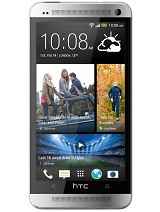
HTC One
MORE PICTURES
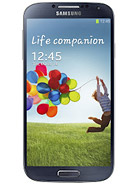
Samsung I9500 Galaxy S4
MORE PICTURES


Design

The design of the two phones are very different with Samsung deciding to stick to its S3 design and HTC brining out a very sexy looking phone made of aluminium. HTC have always made good looking phones with amazing form factor and this is no exception, although the plastic of the Samsung might be more durable, I have to give this to the One as it does look fantastic.


Screen
The S4 has a Super AMOLED 5 inch touchscreen while the One has a Super LCD3 4.7 inch touch screen. Both have the same resolution, 1080 x 1920 pixels, often referred to as 'Full HD'. Since the S4 has a slightly bigger screen, the ppi (pixels per inch) pixel density is slightly lower as it covers a larger area so we get 441 ppi for the S4 and 469 ppi for the One. The winner really depends on how you look at it, but given the S4 has Cornering Gorilla Glass 3 instead of 2 to protect the screen, I am tempted to just give it to the S4 but let's call it a draw.

Storage
Quite an easy one here, the S4 comes in three different storage capacities, 16/32/64gb while the One has two, 32/64gb but the winner is the S4 by a mile as it has the ability to increase storage using a microSD card up to 64gb. I can't see it any other way, microSD slot is always a winner in my eyes.

Connectivity
Boring stuff here, but basically the two phones have more or the less the same type of connectivity here. They are both LTE capable, so 4G in areas which it is available, they both have v4.0 Bluetooth, NFC, infrared ports and microUSB v2.0. The only slight difference is that the S4 has USB on-the-go which means you can plug in extra storage if you ever need it, something which will probably be available for the One if you decide to go down the custom firmware route. We'll call it another draw.

Camera
The S4 has a 13 megapixel camera while the One has a 4 megapixel camera which they have marketed as the 4 Ultra Pixels camera. At first glance you might think that S4 wins but early camera comparisons have shown that the One does indeed appear to perform better. I think it's always important to bear in mind higher megapixels isn't always better and the One indeed seems to prove this. Have to give it the HTC One for the camera.

Processor and graphics
On paper there doesn't seem to be a competition here. The S4 has the Exynos 5 Octa 5410 which is an eight-core processor while the One has a Qualcomm APQ8064T Snapdragon 600 processor which is quad-core. So the S4 has four more cores than the One, but again until these are properly benchmarked then it's not easy to compare. In terms of the GPU (graphics processing unit), it's another difficult one with the S4 sporting a PowerVR SGX 544MP3 and the One with the Adreno 320. A lot of fancy words and numbers there but S4's GPU has three cores clocked at 533 MHz which is roughly between the performance of the iPhone 5 and the iPad 4. The Adreno 320 is a little bit older and has already been featured in the Nexus 4. Overall I think we'll have to give this to the S4 in theory and wait to see what happens in reality.

Sensors and features
The S4 will come fitted with the usual accelerometer, gyro, proximity and compass, all of which the One has too but on top of this, the S4 will also include a barometer, temperature and humidity sensors. These are going to be used for various features that come with the S4. Talking about features, Samsung have introduced a lot of new things that the S4 will bring. Overall this round goes to the S4 as Samsung appear to have added in many little things, some gimmicky, that I can see being quite useful such as touch-less gestures, dual camera, drama shot, S-translate and so on.

Battery life
I don't know why HTC continue down this road but they've fitted the One with a non-removable 2300 mAh battery while the S4 has a 2600 mAh battery that is removable. It's a no brainer for me, the S4 wins in this category as I have the choice of buying an extra battery if I wanted to and overall it does have a higher capacity battery fitted.

Final remarks
Samsung - 6
HTC - 4

Obviously this is my view but I find the S4 more appealing that the One, maybe because of a slight brand loyalty to Samsung nowadays or it might just be that it is the better phone, either way I firmly believe that Samsung will sell many more units than HTC and this is most down to their incredible marketing budget! Having said that, my next phone is likely to be the S4.

Mo

Saturday, 2 March 2013

Virus scanner for your phone? Hell no!

Are they being serious when they say you need to have a virus scanner for your Android phone? I never understood who 'they' were and why 'they' recommend this but no doubt a lot of people have virus scanners on their phone. Phones are becoming more like computers nowadays, but I'm still adamant that 'they' are giving the wrong advice to people about this topic.

The Play Store and Malware

Android is not Windows, it doesn't need a virus scanner unless you're really pushing the envelope in terms of dodgy activities on your phone. For the average user of an Android smartphone, downloading apps from the Play store, browsing the web, checking social networking and so on are all perfectly safe tasks that you can do without the worry of malware (malicious software; an umbrella term for viruses, worms, trojan horses and so on). Sure there have been reports of malicious apps making their way onto Google's Play Store but Google is constantly monitoring the apps that are published on there using Bouncer, an automated system checking all apps published. Google also remotely monitor apps that are installed on phones to prevent an app that is later flagged as a virus or one might have been downloaded from a third party source remaining on the end user's phone. This technique might seen invasive but think of it as someone doing the rounds on the apps you have installed rather than rifling through your personal details.

Safest way to download

There are many ways that users can prevent a virus or other types of malware making their way onto their phones. It takes just a little bit of vigilance which will save you a lot of headache. The easiest way is to download apps from the Play Store as opposed to other sources. This will dramatically reduce the chances of having malware on your phone as any app on the Play Store will have gone through Google's checks before being made available. After all, when you download an app you only see the file size and you unless you're a programmer, you don't even know what the app contains. You end up having to trust the source you downloaded the app from. There are literally thousands of apps on the Internet that you could potentially download that would fool you into thinking they are genuine when really, they are running background processes doing who knows what to your phone.

Permissions, permissions, permissions!

Always check the permissions of any app you download. This might seem a bit time consuming but it's definitely worth doing. Always think about the app you are about to download to see if you can justify why they need the permissions stated. Most developers avoid asking for permissions which aren't required by their app as it arouses suspicion. You should also be wary of an app that requires new permissions during an update. Developers usually justify the reason for new permissions but think about whether it's actually needed or not. If not, simply don't update the app and voice your concerns to the developer.

Play in my Sandbox?

Android has a sandboxing feature which basically separates each application so that it only acts within certain parameters, namely the permissions it has been granted by you. This means applications cannot interact with each other so if a malicious app tries to read your contacts, it will simply fail if it does not have the specific permission. This is a very handy feature to prevent any apps running rampant on your phone. This feature doesn't allow apps to completely corrupt the phone's memory either, like you might see with other operating systems. The memory for each app is sandboxed too so if an app attempts any such thing, it will just end up crashing itself and nothing else, very handy if you end up in that situation. This safety feature drastically limits the damage a rouge app can do but doesn't eradicate the problem completely as the app can still carry out tasks within its given permissions which is why it is vital to check the permissions an app is asking for before installing.

Still not convinced?

If you're still worried about malware then obviously I can't stop you downloading a virus scanner but just bear in mind the safety features and failsafes built into Android and the common sense that you, as a user, can apply when downloading apps. Then make sure you free yourself from battery draining virus scanners!

Mo

Thursday, 28 February 2013

Android and battery life - not a lost cause yet.

How long does your Android powered smartphone last with a full charge? My guess is that no more than a day, maybe two at a big stretch. Hell, I don't think people who claim their phone lasts two days are using it enough! My phone is currently sat here on 22 per cent battery remaining and I've only used it for nine hours. To be fair, I've used it for a run amongst a lot of other things today so this is a bit of a special case. Usually it does last me the whole day without any problems.

In my mind, I think a lot of people are missing out on decent battery life because of ignorance. Not to say I blame them, finding out why your phone doesn't last too long after a full charge isn't easy, but it's not that difficult either. I'll explain what I mean and how I try to extend my phone's battery life.

Background apps

First, let's talk about how your phone is inadvertently draining without you even realising. How many applications do you have installed on your phone? How many of them are running services in the background that you're aware of? The chances are that you don't know, or you do but only to some extent. The easiest way to check is to have a look in the phone settings, then click on 'Applications Manager' and scroll to the right to have a look at the running applications and services. Take a look at the list and see if any of them surprise you. Every widget you have on your phone's launcher (the thing you see when you press the home button) will constantly run in the background, after all it needs to since it's an interactive widget and if it didn't then nothing would happen when you tap on it. Strip them away and what else is left? There could be some applications which you didn't expect to run in the background. These are generally the ones to look out for as they can cause extra battery drain. Usually you can open up the application that is running in the background and adjust the settings so that it desists from doing so, at the cost of maybe giving you push notifications. If some applications don't have the option to stop running in the background or you think they shouldn't be, then I would suggest getting in touch with the developers and/or removing the app. Most apps shouldn't run in the background unless they're giving you something back.

Extending battery life

Now lets talk about ways to save battery life, I alway see posts on forums on how to do this but most of the time they're just a bit over the top and generally limit the functionality of your phone. For example, using 2G (Second generation) network rather than 3G/HSDPA (Third generation/High-speed downlink packet access). What is the point of having a fast data connection and smartphone if you're going to limit yourself to technology first introduced in 1992? I'm going to try to be different, I'm not going to tell you to put your phone in airplane mode until you need to make a call or anything like that. Instead I suggest using Tasker and Juice Defender (Standard and Ultimate combined) to come up with ways of saving battery when you are definitely not going to use your phone. Both of these applications are on the Play Store and they are very powerful tools, although Juice Defender unfortunately seems to be lacking updates at the moment.

Match made in heaven 

Starting with Tasker, you can set it to disable auto-sync, turn off data connectivity or reduce screen brightness (amongst a whole host of other things) to its lowest level during certain times of the day to save battery. Most people sleep during the night (hear me out before you say anything!) and don't need their phone to retrieve emails and other notifications. So instead of disabling auto-sync at night or turn off data manually, you can make a profile in Tasker that does it automatically, say between the hours of 12 midnight and 8 in the morning, every day. This saves a lot of battery and you'll find your battery hasn't drained nearly as much during the early hours as it would have done otherwise. You can also set an end task so that Tasker enables auto-sync at the end of the time period so the next day you'll get push notifications. I used to use this to save myself some battery during the night until I started using Juice Defender and Tasker combined.

Juice Defender by itself can save you a lot of battery, but if you're like me and always on your phone you might find it a little annoying especially when it comes to applications like Whatsapp. I've resorted to using Juice Defender while I'm asleep instead of all the time. Tasker is able to enable/disable Juice Defender so you can set up a profile in Juice Defender and then let the two apps do all the work at night. You can set Juice Defender to do a lot more to save battery with a lot more ease compared to Tasker alone so these two apps make a perfect couple for saving battery.

Wrap up

I've only scratched the surface of the functionality of these two apps and how to save battery but it's definitely a start. I've also tried to keep this guide for non-rooted phones as everyone can benefit this way. Have a play around with both of the apps until you get the hang of them and take control of your phone and it's battery usage! There's a bit of a steep learning curve but you'll be so happy once you've passed it.

Apart from this, there are other way of reducing battery drain but I don't believe in reducing your phone's functionality for more battery. Like I said before, it defeats the purpose of having a smartphone in the first place!

Mo